Everything in the app, and where it's headed.
This page goes through the app one part at a time. Every picture is a real screen, showing a demo climber's training. The roadmap is at the bottom.

Log a session while you climb.
Start a session when you get to the gym or the crag. Log each climb as you go, and finish when you're done. The app keeps the totals.
- Count by grade. Tap a grade each time you finish a problem. The app has eleven grade systems, so you can use the one you know.
- Named climbs. Give a climb a name to keep your tries and a note with it. A boulder can be a flash, a send or attempts. A route can be an onsight, a flash, a redpoint, or logged with falls or hangs.
- Running totals. Your problem count, average grade and hardest grade update with every climb you log.
- Gyms and crags. Start typing to find your gym, crag or route in a growing list. If yours isn't listed, add it yourself, and it's there next time.
- Your last visit. When you go back to a gym or crag, you'll see what you did there last time beside what you've done today.
- Injury notes. When you finish, you can note anything that hurt, like a tweaky finger. The note stays with that day and shows up in Reflect's logbook.
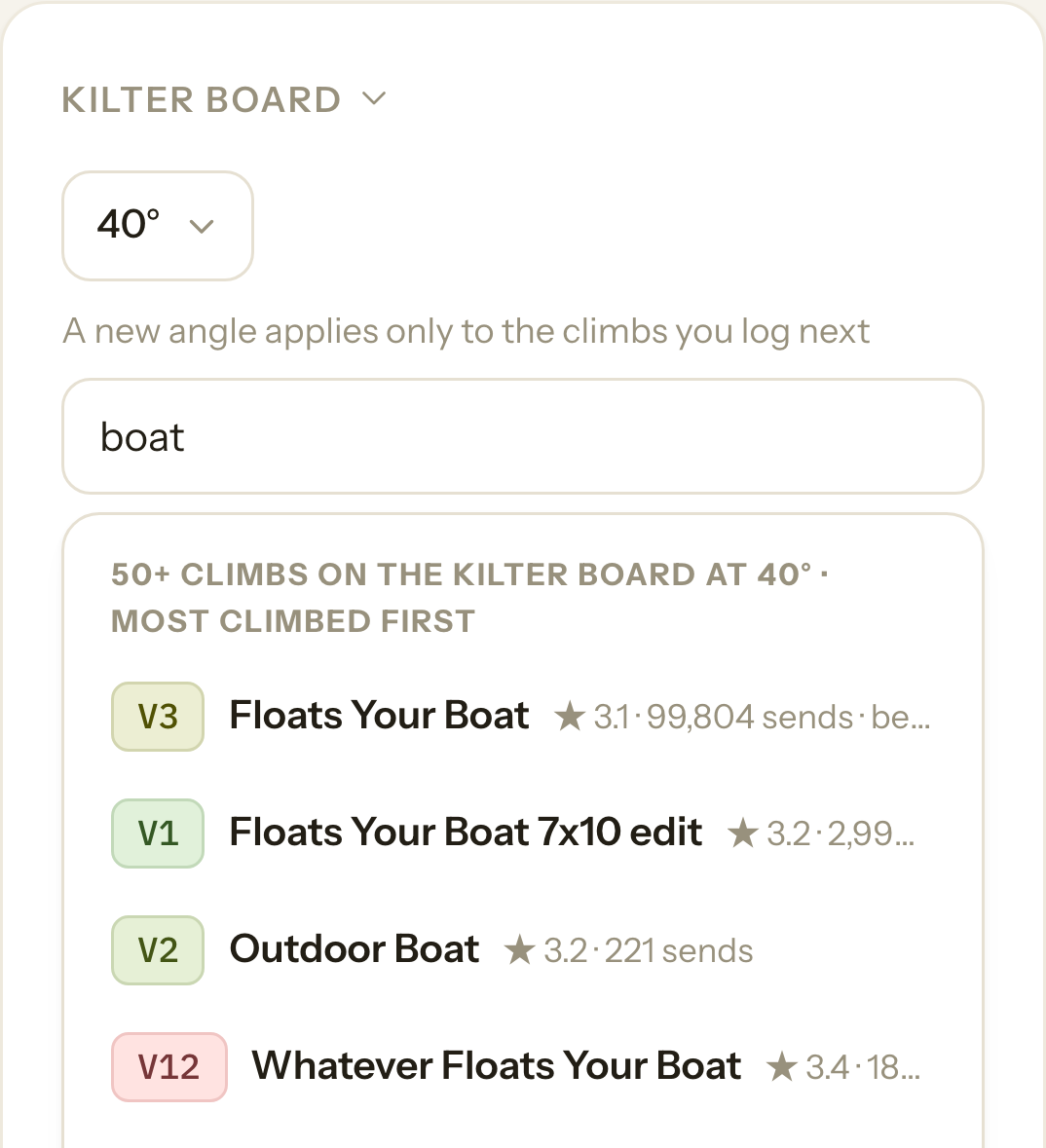
Log your board climbs.
You can log climbs on Kilter, Tension, MoonBoard, Decoy, Grasshopper, So iLL and Touchstone boards. The app has sixteen board layouts.
- Search by name. Set the angle and search the board's problems by name. Each result shows its grade at that angle.
- Tries and sends. Log each try with its own note, then log the send. Your history on a problem is one tap away.
- Counts like any boulder. A board send goes into your session totals and your pyramids, the same as any other boulder.
- Your own problems. If a problem isn't in the list, you can log it as your own.
- A page for each board. Reflect keeps your sessions, sends, flashes and projects for every board you climb on.
Climb Kaizen is not affiliated with or endorsed by Kilter, Tension, Moon, Aurora, Tindeq or any other company named here.

Build your workouts and log your training.
Save the workouts you repeat as templates. When you train, log what you actually did, set by set.
- Templates. Build a workout from the list of movements, or add your own. Each movement keeps its sets, grip and edge size.
- Live workouts. Tick each set as you finish it. One tap copies your numbers from last time, and the app adds up your volume.
- Left and right. For one-arm and one-leg movements, a left and a right count as one set.
- Change it as you go. Add a set, drop a set or change the weight. Your history keeps what you did, and you choose whether to update the template.
- Celebrate wins. When you lift more or hang longer than you ever have, the app points it out when you finish.
- Pounds or kilos. Train in either. If you switch, your past workouts are shown in the new unit, and nothing you logged changes.
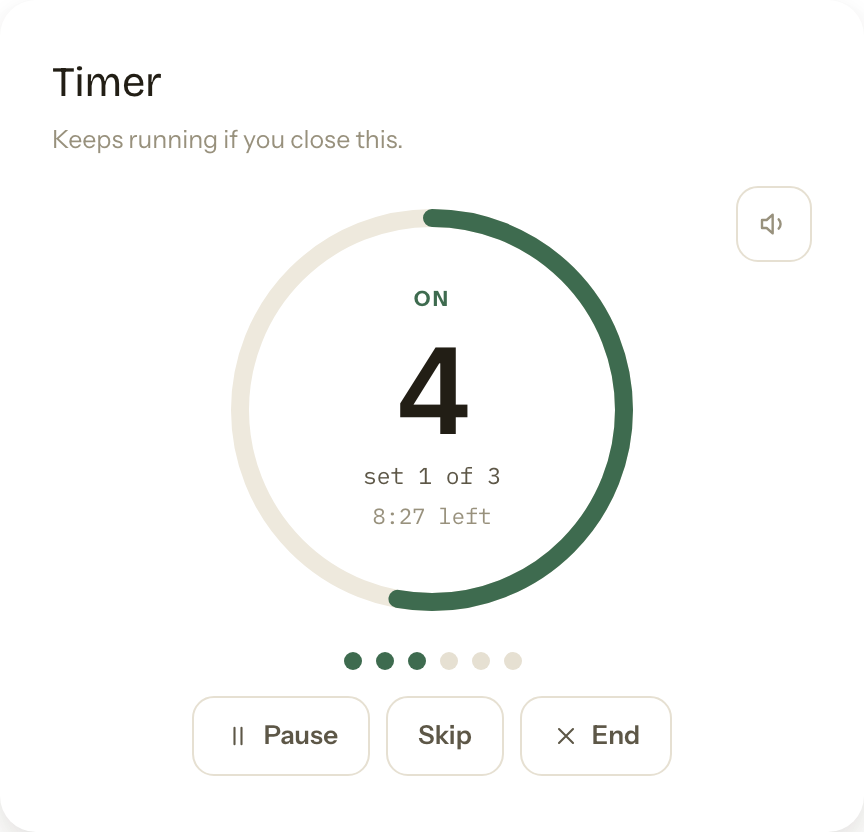
Time your hangs and rests.
The timer runs inside a session or a workout. Start it from an exercise and it can log your sets when it finishes.
- Four modes. Repeaters, rests, on-the-minute and a stopwatch.
- Saved protocols. 7:3 and 10:5 repeaters, max hangs and critical force are built in. Save your own and they sync to every device you use.
- Lead-in. Add a countdown of three, five or ten seconds before a hang. The clock starts once you're on the edge.
- Logs your sets. When the timer ends, one tap logs the sets you finished. If you stopped early, it logs only what you did.
- Chimes. Choose a marimba, a bell or a woodblock. On a phone, sound only plays while the app is open on screen.

Measure your pulls with a force sensor.
Connect a Tindeq Progressor and watch your force while you pull. The app keeps the curve of every pull you log.
- Live reading. See your force, the curve, your peak and how long you held, in pounds or kilos.
- Log pulls to a workout. Review your pulls, set the hand for each one, and add them to the exercise you're doing.
- Three tests. Peak force over five or ten seconds. Endurance over thirty or sixty seconds. Critical force, a test of 24 pulls that takes about four minutes.
- Left and right hand. Reflect charts each hand over time and compares your left with your right.
- Where it works. In the phone apps, and in Chrome or Edge on a computer or an Android phone.
- Sensors. The Tindeq Progressor today. The WH-C06 is next.

Plan your weeks and your season.
Put your climbing and training on a calendar. Days are checked off as you log them.
- Calendar. Plan climbing days, strength days, runs and rest days. Give a day a place and a focus, repeat it every week, and move it when your week changes.
- Training phases. Name a block of training and give it a colour and a length. It shows across the calendar, and Home tells you which week of it you're in.
- Trips. Add a trip with a place and dates. Afterwards, Home shows what you logged there.
- Checked off for you. A climbing day is marked done when you log a session. A strength day is marked done when you log a workout.
- Goals. Track a goal with a pyramid, with numbers, by how it feels, or in your own words.

Build a pyramid toward a grade.
Pick the grade you're working toward. The tiers below it fill in as you send.
- Fills from your log. A clean send that you logged by name goes into its tier. That includes sends from before you made the pyramid.
- Everywhere or one place. Count sends from any gym or crag, or only from one. A crag includes its sectors.
- Ticks and targets. Open a tier to tick a route yourself, or to pin the route you want to do next.
- Routes or boulders. For routes, count every style, or only sport, trad or top rope.

Test yourself and see what changed.
Set up a test day once, then repeat it every month or every few months. Each result is shown next to your last one.
- Start from a template. There are two ready-made test days. You can also build your own from 35 measures, any movement in the library, or a measure you write yourself.
- Compare with last time. Each test starts blank, with your previous result beside it.
- Filled in where it can be. Sleep and steps come from your check-ins. Peak force and critical force come from a sensor test you did that day. Lifts and hangs are yours to do and enter.
- Any device. Start a test day on your computer and finish it on your phone.

See how your climbing is changing.
Look back over three months, six months or a year. Every number comes from something you logged.
- Trends. Your average grade, your monthly volume and your density, which is how much climbing you fit into a session. Each shows how it has changed.
- Send ledger. Every climb in the period, counted by grade. Indoors and outdoors, boulders and routes.
- Consistency. A grid of the last sixteen weeks, showing the days you climbed, trained or rested.
- Month by month. A table of your sessions, time on the wall, strength work and hardest sends.
- Progression. A chart for each movement you train most, drawn from your top sets.
- More pages. There's a page for each body reading, each force test and each board.
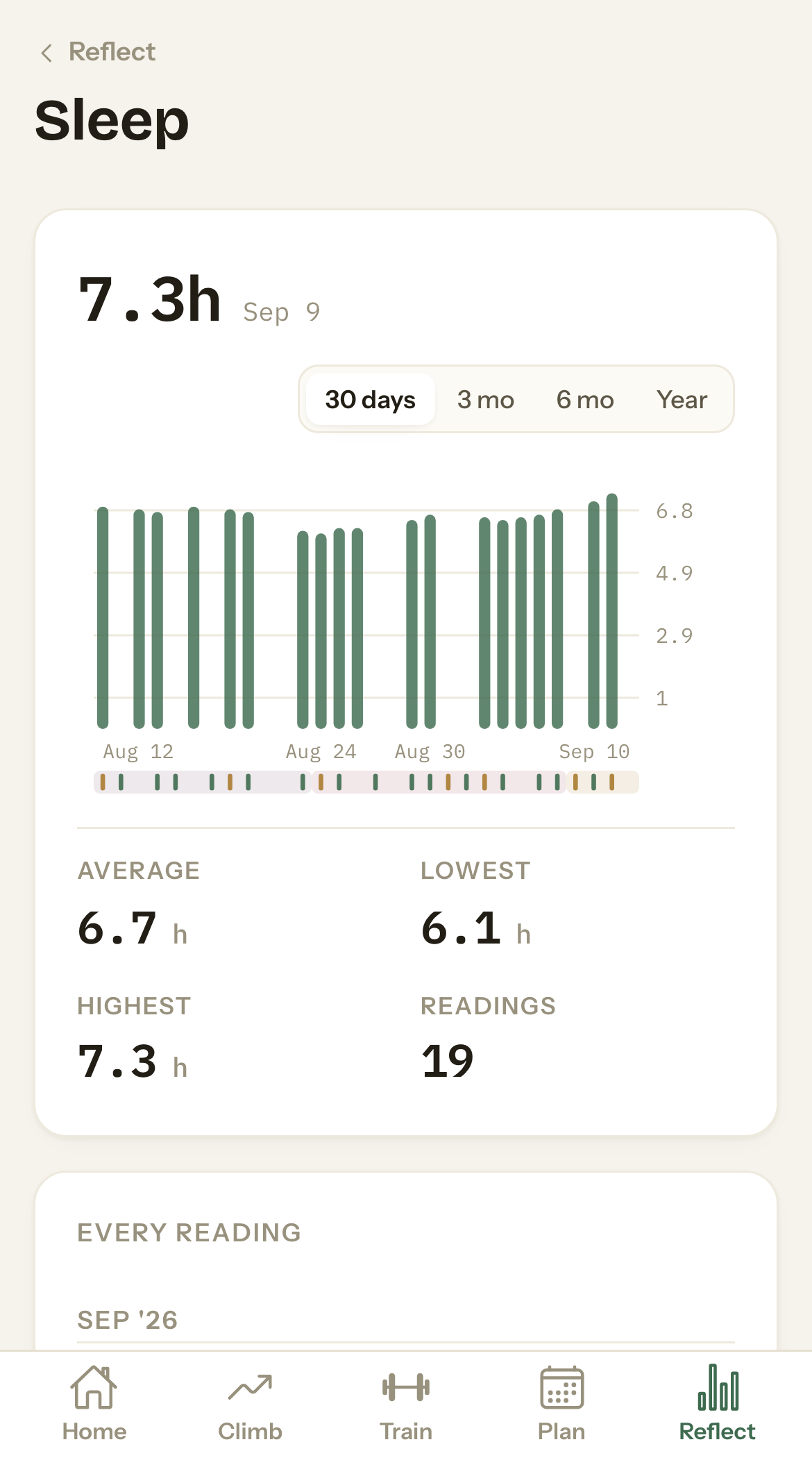
Track sleep, recovery and your cycle, if you want to.
There's a short daily check-in, body readings and a cycle tracker. All of it is optional, and all of it is off until you turn it on.
- Twelve readings. Sleep, steps, soreness, stress, motivation, resting heart rate, HRV, weight and a few more. Turn on only the ones you want.
- Filled in by your phone. The phone apps can fill in readings from Apple Health or Health Connect. If you type a value yourself, yours is kept.
- Cycle tracker. Log period days with one tap, and add flow and symptoms if you want to. You can go back and correct a day, in this cycle or a past one.
- Next period. Your next period is shown as a range of dates. If there isn't enough history to estimate it, nothing is shown.
- Your plan doesn't change. Your training days show on the same dial as your cycle. The app never changes your plan based on your cycle.
- Private. We don't sell your data, and no outside advertiser or data broker gets it. Body and cycle readings are kept out of our product analytics. Cycle days are left out of your exports unless you choose to include them. You can delete your body readings or your cycle data on their own, at any time.
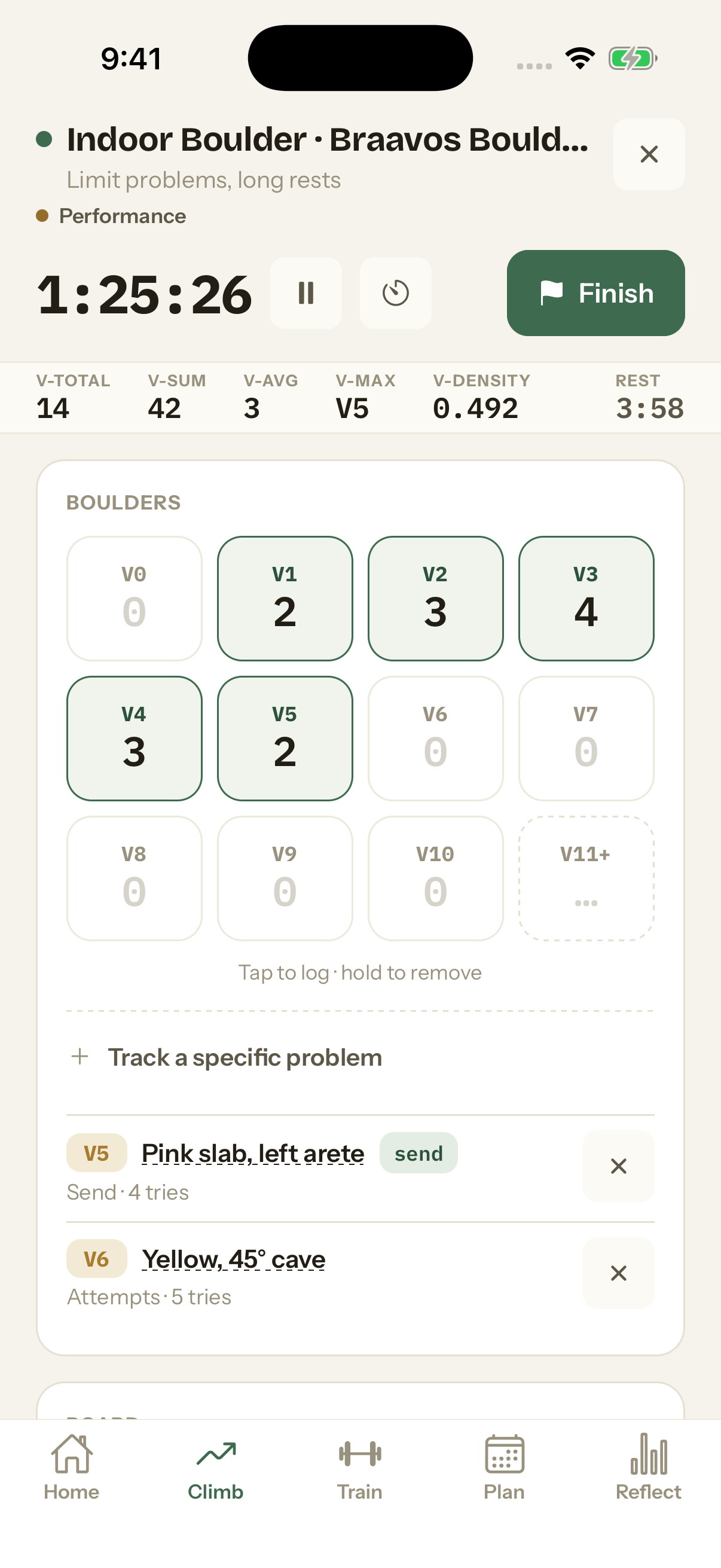
Take it to the wall on your phone.
The iPhone and Android apps share one log with the website. Home shows today's plan and your latest numbers.
- Today's plan. See what's planned, what's done, and which week of your training phase you're in.
- One-handed logging. The logging screens are made to use with one hand, between attempts.
- Lock screen. During a session, the clock and your rest timer stay on your locked phone.
- Synced with the website. Log at the gym and plan at home. It's the same log.
- iPad and landscape. The app turns with your phone, and the iPad has layouts of its own.
- Your settings. Six colour themes, eleven grade systems, feet or centimetres, pounds or kilos.
What's here and what's next.
- Sessions: boulders, routes and board climbs, with live numbers
- Training: templates, live workouts, a hang timer
- Plans: calendar, phases, pyramids, goals, trips, test days
- Reflect: trends, the send ledger, pages for body, force and boards
- Gyms, crags and board problems to pick from
- Force-sensor tests with a Tindeq Progressor
- Daily check-ins, body readings and the cycle tracker
- Apple Health and Health Connect, on the phones
- Grade systems, units, crag moods, export
- The iPhone, iPad and Android apps, on their way to the App Store and Google Play
- Structured climbing sessions: 4×4s, on-the-minute, ARC sets and limit bouldering, as presets to start from
- Plan a session before you climb it, and keep both the plan and what you actually did
- More routes and problems in the catalog, so logging outside takes less typing
- A deeper Reflect: more charts and more ways to visualize your data
- A second force sensor: the WH-C06
- Coaching: work with your coach, or plan for your athletes and see their weeks
- Video study and analysis
- Educational material and programming
- The app in more languages
- Optional sharing: a session summary for Instagram or Strava
- Logging from an Apple Watch
- Polishes and papercuts. Our kaizen philosophy also applies to making this app better for you.
- And what you tell us you need
Something missing? Put a stone on the board, or write to us: hello@climbkaizen.com
Try all of it free for 30 days.
You don't need a card to start. You can export your log any time.